

It’s Monday morning, and your executive pastor is three tabs deep before his coffee has cooled. One tab holds giving. Another holds events. A third is the spreadsheet someone built two years ago, which only makes sense if you know where to click. By the time he's pieced together how last week actually went, his morning is half gone, and he hasn't had time to think about what comes next.
This is the normal, unglamorous reality for most people running church operations. The trouble rarely shows up as one big crisis. It shows up as a dozen small ones, hidden across a dozen different places. This type of disconnect continually costs church leaders valuable time, staff resources, and the clear view they need to make confident decisions.
That’s the Monday morning we had in mind when we redesigned the Subsplash Dashboard Home, so you can see how your whole church is doing before your coffee gets cold and plan to take action where needed. Let’s take a look at what’s new on the Subsplash Dashboard, and how it can make an amazing difference!
Why church leaders need a better dashboard
Time is the resource church leaders feel shortest on. In a Lifeway Research study of 1,000 U.S. Protestant pastors, 51% said time management needs attention in their lives today. On top of that, 55% said avoiding over-commitment and overwork is a challenge. Those numbers come from pastors, but anyone who’s served on a church operations team knows the feeling.
Right now, church leaders have two options, and neither one is good: You can trust your gut and hope you’re reading the room correctly, or you can spend an afternoon pulling reports together.
Gut calls miss things, like important giving trends and workflows for new visitors. Afternoons in spreadsheets are afternoons spent away from people. Neither option holds up or works well for a life in ministry.
The good news is that you don’t have to choose! By utilizing the right technology for churches, your systems can work for you rather than against you. Luckily, most church leaders already see technology as a help, not a hurdle. Barna’s 2026 research found that 95% of church leaders agree technology opens new opportunities for ministry.
The next step is making that technology easier to read at a glance for your ministry, so you can easily spot what’s working, catch what needs attention, and get back to the people behind the numbers.
What’s new on the Subsplash Dashboard Home
Subsplash is the complete platform built for churches, trusted by more than 20,000 churches and ministries to power their apps, websites, giving, media, and church management.
The Subsplash Dashboard is the home base where church staff manage everything on the Subsplash platform, from the app and website to giving, media, events, and groups. And for current Subsplash customers, we’re excited to roll out a new update to the Subsplash Dashboard!
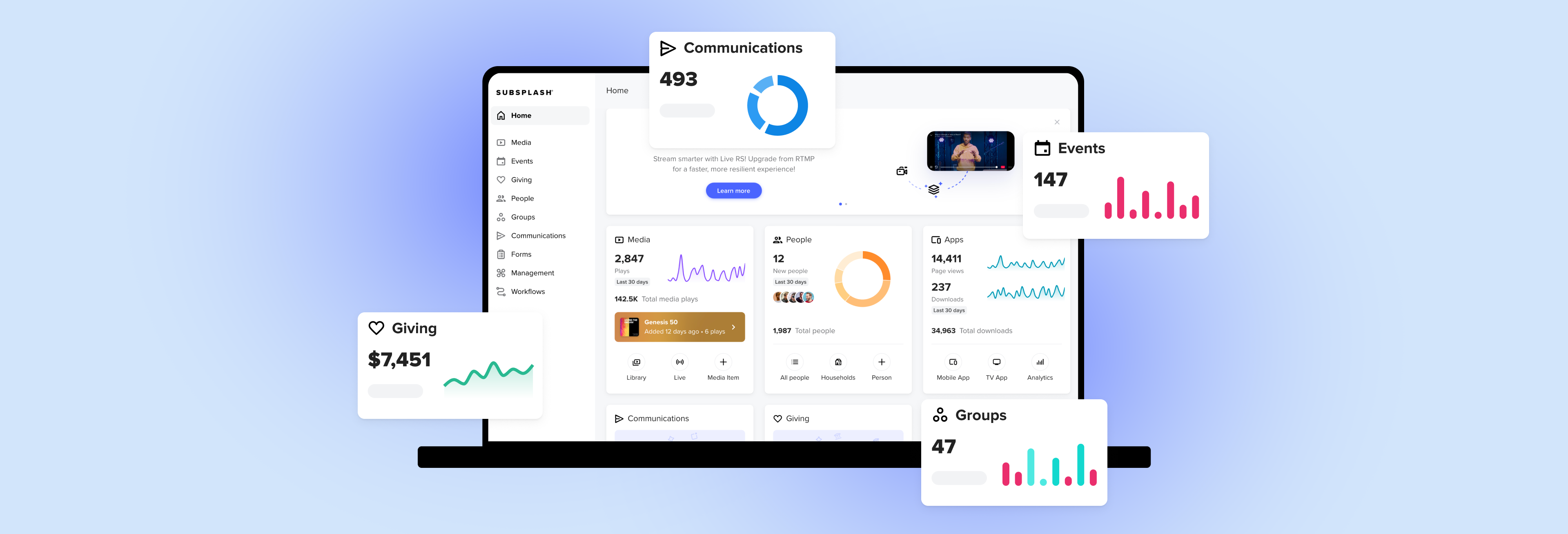
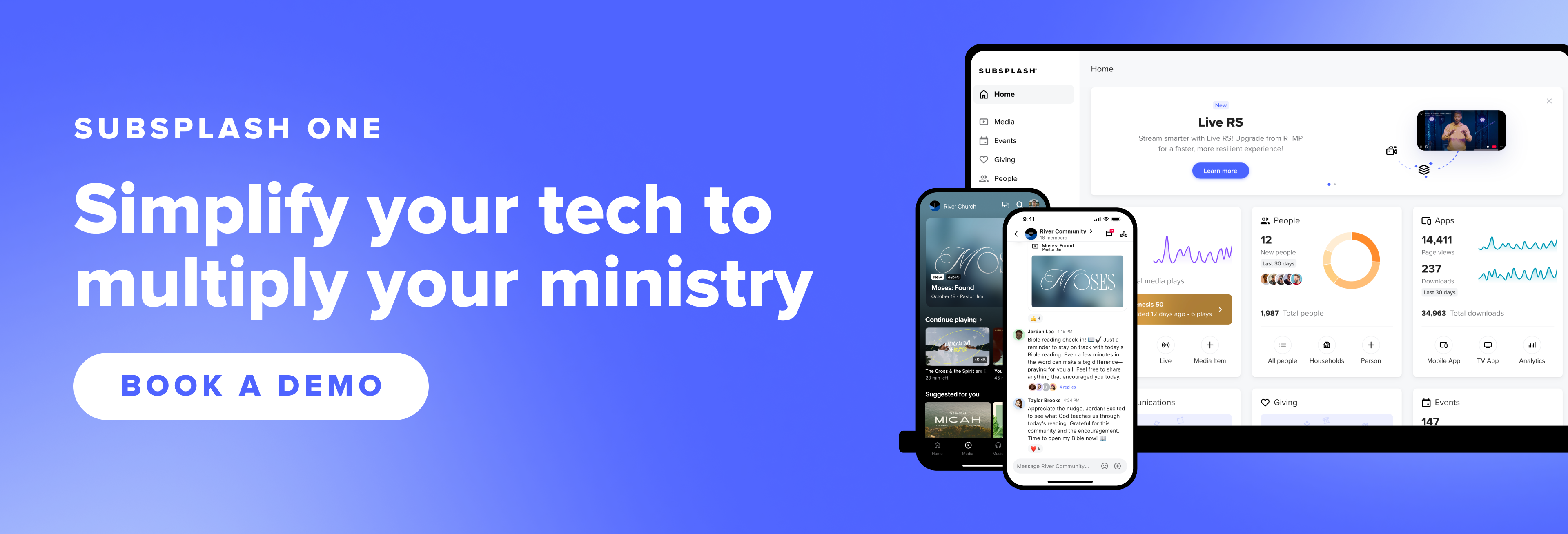
Many church management tools can only report on the data they hold, which is usually just people and giving. Your app, giving, media, events, and groups all run on Subsplash One, and the refreshed Dashboard Home page brings all of it into one view. Here’s what you’ll see:
- Up to date data: Each card refreshes at least once a day and shows the latest available data. What you see reflects what’s current, not whatever was true the last time someone pulled a report.
- Every ministry area in one view: People, Giving, Events, Groups, Media, Forms, Workflows, and Apps each get their own card.
- Built-in trend charts: Tend line charts, donut charts, and column charts show how things are moving, with nothing to configure.
- Shortcuts on every card: Each card has two or three shortcuts. Some jump to a list or to detailed analytics, and others let you act right away, like uploading media or creating an event, group, or form.
- Activity feeds: Recent activity shows up on the homepage, so you can see what’s happening without opening each area.
- Quick-action shortcuts: Create an event, check your Workflows cards, upload media, and more, right from the card.
If you’re exploring Subsplash for your church, this Dashboard Home shows what it’s like to run your ministry from one place. Your people, giving, events, and media all share the same platform, so they can show up together on one screen. You won’t need separate logins, exported reports, or a spreadsheet someone has to keep updated.
Check it once a day or once a week. When something needs your attention, you can take care of it right from the Home page.
Spot it on the Dashboard, act on it from the same card
Every card on the new Dashboard Home comes with two or three shortcuts for that ministry area, saving you clicks and time. The People, Groups, and Events cards link straight to their lists, so you don’t have to go through the left navigation. Others let you act right on the spot, like uploading a media item or creating a new form, group, or event.
The charts and feeds show you where to look, and the shortcuts get you moving from there. If Sunday’s sermon isn’t posted yet, you can upload it from the Media card. If a first-time guest needs follow-up, an outstanding card on your Workflows card is one click from your cards screen.
When a number deserves a closer look, you can open detailed analytics for giving, your app, media, and group attendance. The Dashboard gives you the overview, and those reports fill in the specifics.
Fortunately, there’s nothing new to connect or configure, and no one on staff has to maintain it. The charts and feeds are already running when the page loads. When you want to dig deeper than the Home page shows, Trends AI and our guide to church analytics can take it from there.
Considering Subsplash? Here’s what this tells you
If you’re comparing church management software, a homepage like this says a lot about what sits underneath it. Subsplash One runs your app, giving, website, media, events, groups, and church management on one platform with one shared people database.
Because your data already lives in one place, the Dashboard can show it in one place, with no integrations, exports, or staff members stitching reports together. If your team logs in to separate tools today for giving, check-in, and media, this is what consolidating looks like in practice. You can read more about how integrated church platforms simplify administrative work.
Church Dashboard FAQs
What is the Subsplash Dashboard?
The Subsplash Dashboard is where church staff manage every Subsplash product under one login. That includes the app, giving, website, media, events, groups, and church management tools.
What changed on the Subsplash Dashboard Home?
The Home page now shows all your essential ministry areas (People, Giving, Events, Groups, Media, Workflows, Forms, and App) on one screen. It adds built-in trend charts, activity feeds, and quick-action shortcuts on each card.
Do I need to set anything up?
No. The charts and feeds are built in and start working as soon as you log in.
How current is the information on the Dashboard?
Each card is updated daily to show you the latest available data every time you open the page.
Who is the new Home page designed for?
It’s built for executive pastors, operations directors, and any admin who needs a quick, reliable read on how the church is doing.
Can any users see Giving data?
Giving data adheres to administrative permissions, so any Dashboard user who isn’t a Giving manager will not see anything on the Giving card.
Your next step is already on the page
Whether you log in to Subsplash every day or you’re exploring it for the first time, the new Dashboard Home shows what ministry looks like when everything lives in one place.
If you’re already a Subsplash customer, the refreshed Dashboard Home is live and waiting for you! Log in and take a few minutes to explore the cards for each ministry area. Maybe take a first step in using a part of the Subsplash platform you haven’t tried yet. Try a shortcut or two, and see how much of your week you can read from a single screen.
If you’re still looking for the right platform for your church, this is a good time to see Subsplash in action. With all your tools on one platform, the whole picture starts on your Home page. Your team spends less time piecing information together and more time on the ministry it supports.
[.blog-contact-cta]Connect with our team today[.blog-contact-cta] to discover how unified technology can help you keep your church connected and engaged all year long.