






Picture a finance director of a church comparing software vendor websites late on a Tuesday evening. One site promises to streamline Sunday check-ins and small group rosters, while another promises to build donor pipelines and track guest follow-ups. Both claim to solve administrative bottlenecks, yet neither clearly explains where one category ends and the other begins. When you are trying to manage a growing budget and keep your board informed, choosing between a church management system or a CRM can quickly become frustrating.
Managing software line items often feels like an endless administrative puzzle. You buy one tool for volunteer scheduling, export spreadsheets into another tool for pledge tracking, and manually clean up duplicate contact records at the end of every month. Your executive leadership wants clear metrics, your ministry teams want easy tools, and your finance team wants to stop paying twice for overlapping features. Clarifying what each tool provides helps you make a confident decision for your team.
What is a ChMS?
A church management system is built primarily to handle operational administration across your entire organization. It serves as the primary engine for Sunday morning logistics, facility scheduling, child check-in stations, and congregation-wide communication. When leaders search for the best church database software, they are usually looking for a ChMS to organize weekly operations and keep church records structured.
The core functions of a ChMS center around high-volume, broad administrative needs:
- Child check-in & security: Generating name tags, printing security codes, and tracking medical notes for nursery and kids programs.
- Attendance tracking: Recording Sunday service headcount, tracking volunteer attendance, and reviewing group attendance patterns over time.
- Batch giving & contribution statements: Processing Sunday tithes, managing recurring online gifts, and generating year-end tax statements for donors.
- Group management: Organizing Sunday school classes, serving teams, and home groups into structured, manageable rosters.
- Mass communication: Sending email blasts or broadcast text messages to active ministry lists and group rosters.
Because a ChMS focuses on institutional maintenance, it excels at managing large groups of people efficiently. Traditional management systems ensure that Sunday morning runs safely and that giving records remain balanced. They give administrative teams the structure necessary to manage rosters, process transactions, and coordinate facilities week after week.
When comparing church CRM versus ChMS platforms, operational leads quickly notice this structural distinction. A traditional ChMS maintains your database and keeps Sunday logistics moving smoothly. It ensures your nursery is secure, your financial reports balance, and your rosters stay accurate. Yet as churches grow, leaders often realize that operational tracking alone is not enough to pastor people on an individual level.
What is a church CRM?
A church CRM—or customer relationship management tool adapted for ministry—focuses on individual relationships, donor engagement, and personal care pathways. Originating from non-profit donor platforms and corporate sales tools, church CRM software tracks how an individual moves from an initial visitor to an active, connected member. Rather than focusing solely on Sunday logistics, a CRM centers on the depth of engagement behind each individual profile.
The primary capabilities of dedicated church CRM software center on relationship depth and tracking personal interactions:
- Comprehensive contact records: Storing individual interaction histories, notes from pastoral visits, and detailed family connections in one central profile.
- Donor relationship management: Tracking giving trends, identifying lapse patterns, and nurturing donor relationships over extended timeframes.
- Follow-up pipelines: Assigning automated tasks to staff members when someone fills out a connect card, submits a prayer request, or requests information.
- Discipleship pathways: Monitoring where individuals are in spiritual next steps, such as baptism, membership classes, or leadership training.
While a ChMS keeps your weekly programs structured, a CRM helps you care for the individual standing in your lobby. It allows pastors to see when a long-time member stops attending or when a first-time guest needs a follow-up call from a leader. Understanding their differences helps you identify whether your current administrative gap is operational efficiency or relational follow-up.
The challenge with relying exclusively on a standalone CRM is that it operates in isolation from Sunday logistics. If your donor tracking tool cannot communicate with your Sunday check-in software, staff members end up manually copying information between systems. That double entry drains time from ministry and creates mismatched donor records that confuse leadership during budget reviews.
ChMS vs. church CRM: side-by-side comparison
Choosing the right software category requires evaluating how each tool handles day-to-day administrative tasks. While both systems store member details, their underlying architectures serve completely different primary goals. Examining a side-by-side comparison of ChMS and church CRM functionality highlights where each platform focuses its capabilities.
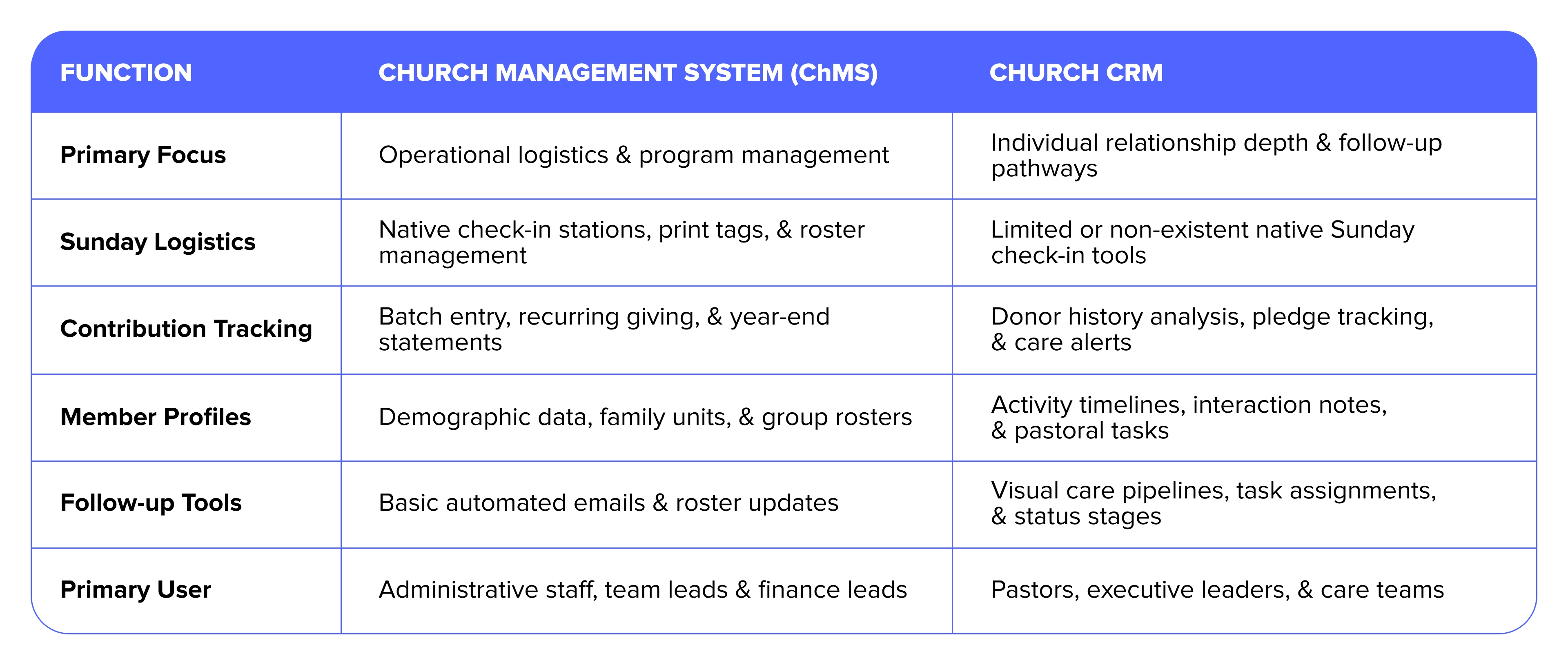
When evaluating church CRM versus ChMS capabilities, finance directors often discover that running separate platforms doubles their software costs while increasing administrative work. Staff members must spend hours reconciling data between systems, leading to human error and incomplete reporting.
Comparing them side by side clarifies why choosing between them feels like an artificial compromise. Your finance team needs the operational structure of a ChMS to manage check-ins and statements, but your pastoral team needs the relational insights of a CRM to care for members effectively.
Where a ChMS and CRM overlap
Over the past decade, the boundary between these two software categories has blurred significantly. As church leaders demanded better relationship tools within their operational software, ChMS vendors began adding basic contact history features. At the same time, CRM platforms realized that churches would not buy software that lacked giving integration or group management.
Comparing their features shows how vendor offerings have shifted over time. Today, many platforms offer capabilities that span both categories, including:
- Centralized member databases with family grouping capabilities.
- Online giving integration and recurring contribution processing.
- Mass email and SMS broadcast messaging tools.
- Group management and team roster tracking.
While this feature overlap creates better options, it also causes confusion for software buyers. A software provider might market itself as a comprehensive platform, yet its CRM tools may amount to nothing more than a basic notes box attached to a contact record. Conversely, a feature-rich CRM might lack native child check-in or robust giving management, forcing you back to third-party integrations.
To evaluate your options thoroughly, explore our guide on the 17 Best ChMS features for a thriving church to see which capabilities matter most for your daily operations. Knowing which features must live inside your primary system helps you avoid purchasing redundant tools.
The real risk of category overlap is paying for duplicate features across fragmented platforms. When your church uses one vendor for giving, a second for check-ins, and a third for donor tracking, your monthly software expenses climb rapidly. More importantly, your data breaks apart into isolated silos, making it nearly impossible to get an accurate view of your church’s health.
Which does your church actually need?
Determining whether your ministry needs a ChMS or a CRM depends on your current staff capacity, administrative friction, and overall organizational priorities. Smaller churches often prioritize operational tools to get Sunday mornings running smoothly, while growing churches need deeper care pipelines to ensure no one falls through the cracks.
Here is a practical decision framework to guide your leadership team:
- Choose operational ChMS priority if: Your primary pain points are Sunday check-in lines, chaotic volunteer scheduling, disconnected group rosters, and manual contribution statement processing. You need a single system to keep programs organized.
- Choose CRM care priority if: Your primary pain points are lost first-time guests, unassigned pastoral care requests, lack of visibility into donor retention, and fragmented follow-up efforts across staff members.
- Choose a unified approach if: You want to eliminate duplicate data entry, lower your monthly software bill, and give every staff member—from the finance director to the lead pastor—a single source of truth.
For finance leads balancing a tight budget, the hidden cost of maintaining separate systems is high. Running two platforms means paying two subscription fees, training staff on two interfaces, and spending valuable staff hours resolving mismatched donor data.
Lead pastors also benefit from a simplified decision. Your team needs a tool that tracks essential health indicators without creating extra administrative work. Review our breakdown of 6 key church metrics & how to track them to align your staff around the numbers that matter most for discipleship.
When you evaluate your options objectively, the choice between finding the best church database software or investing in high-touch relationship tools becomes clear. Your church needs both capabilities working in harmony.
Why more churches are choosing one platform for both
The frustration of choosing between operational management and relationship tracking has led more and more churches to adopt unified platforms. Instead of patching together separate systems that require constant data synchronization, growing ministries are moving toward integrated ecosystems that combine ChMS and CRM capabilities under one roof.
Finding the best church database software means selecting a tool that supports both daily administrative tasks and long-term relationships. Subsplash delivers an all-in-one solution built specifically for ministry needs. By bringing child check-ins, group rosters, giving management, and personalized care workflows into a single platform, Subsplash eliminates the need to choose between a ChMS and a CRM.
Adopting a unified platform provides several clear operational advantages:
- A single source of truth: Every attendance record, donation, message, and follow-up task updates instantly on one member profile
- Reduced software costs: Eliminating third-party add-ons and extra vendor subscriptions keeps your ministry budget predictable and lean
- Streamlined volunteer experience: Volunteers and staff use one intuitive system for Sunday check-ins, small group management, and guest follow-up
- Deeper engagement: Integrated media, custom mobile apps, and online giving connect naturally with your church database, helping visitors take their next spiritual step
Stopping the cycle of software fragmentation frees your team to focus on ministry impact. When you bring your operational tools and relationship tracking together, your administrative processes become simpler and your care pathways become far more effective. To see how Subsplash combines ChMS efficiency and CRM relationship depth in one unified platform, connect with our team today to [.blog-contact-cta]schedule a free demo


%20features%20for%20a%20thriving%20church.webp)