





Churches create and share a variety of content—from discipleship resources and sermon recaps to special events like fundraisers and funerals. But not all content needs to be readily available to the public.
That’s why we’re excited to introduce Unlisted Media—a new way to manage the visibility of your media content.
What is Unlisted Media?
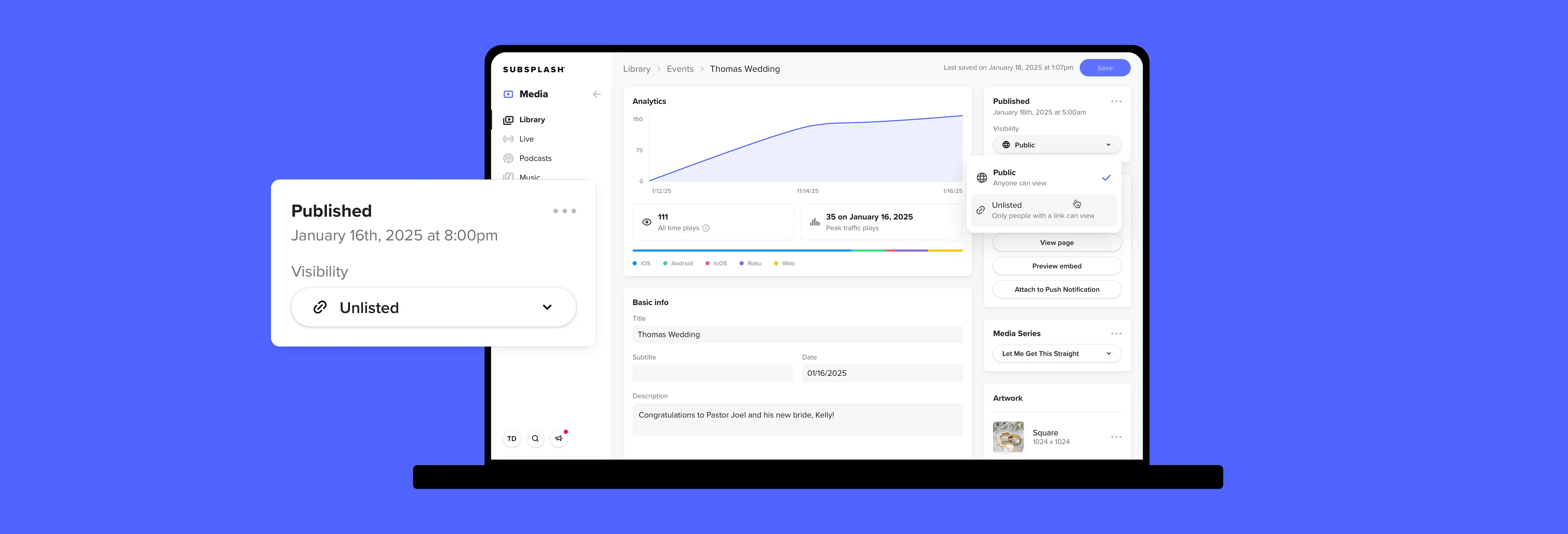
With Unlisted Media, you can choose to keep certain content hidden from public feeds like your app or website. This ensures your content is accessible only by direct link—without appearing in your Media Library, lists, search results, or dynamic filters.
Key features
- Hide select media items & live streams: Keep certain media items and live streams hidden from public feeds and search results.
- Simple sharing: Easily distribute unlisted content via direct link, web embed, or push notifications for targeted engagement.
- Integrated platform & one-click publishing: Manage content seamlessly within the Subsplash Platform. Choose between “Public” and “Unlisted” visibility when publishing media items or live streams.
Common uses for Unlisted Media
- Discipleship content tailored to specific groups like young adults, grief support, single parents, addiction recovery, and more
- Leadership & volunteer training for upcoming events and initiatives, or onboarding and development
- Membership courses for recent visitors and prospective members eager to learn more about your church
- Special event live streams for weddings, memorial services, baptisms, or fundraisers
- Promotional material for upcoming events & ministry opportunities, campaigns, project recaps, and more
How it works
Media items
When creating or updating a media item, select “Unlisted” to prevent it from showing in public feeds—such as your Media Library, Lists, search results, the Bible tab or in places like the Personalized Media Experience in your mobile app.
Live streams
When scheduling or updating a live stream—whether Simulated Live (pre-recorded) or true live event—you can set it as “Unlisted.” This keeps it out of public feeds and embeds even after the event, making it accessible only via a shared link.
Sharing Unlisted Media
Unlisted content is shared via a URL, which can be sent through push notifications, QR codes, Mailouts, or embedded on your website—all easily managed in your Subsplash Dashboard.
Pro-tip: Since anyone with the link has access, avoid using Unlisted Media for truly sensitive or confidential content.
Reach the right people at the right time
Unlisted Media makes it easier than ever to manage your content’s visibility while keeping important media accessible to the right audience at the right time.
[.blog-contact-cta]Schedule a free demo[.blog-contact-cta] today and discover how Subsplash Media can help your church manage and share content.
Already using the Subsplash Platform? Get started with Unlisted Media today—right in your Subsplash Dashboard.
Additional resources you may find helpful
- Introducing Subsplash Live RS—Reliable streaming for every church
- Streamline content discovery with Media Tagging
- Premium discipleship content for your church app
- Best practices for recruiting church volunteers
- Church discipleship: Biblical principles & lessons for today’s leaders

.webp)
.webp)

%20features%20for%20a%20thriving%20church.webp)
.webp)