



It’s Thursday morning, and Linda, the bookkeeper at her church, can’t get her numbers to match. This week’s giving report says $14,280, but Wednesday’s bank deposit says $13,912. She spends the next hour digging and finds processing fees, a refund from two weeks ago, and a Sunday-night gift that hasn’t settled yet. It all checks out in the end, but her notes live in a spreadsheet only she can read. When she takes a week off in July nobody can tell which deposits she already reviewed.
Linda’s situation is more common than it sounds. In a recent Lifeway Research survey, more than 1 in 5 pastors said their church had never been audited or they weren’t sure when the last audit happened. Gaps like this grow easily when gifts come into your church through more channels than ever.
From 2021 to 2025, 38–41% of annual church giving arrived electronically. That rises to 69% for megachurches! That means your church is receiving tithes and funds from all different places—cash, ACH, credit, debit, giving apps, DAFs, cryptocurrency, stocks, and so on. The good news is that the gaps almost always come from the same few areas. Once you know where to look, you can find and explain the difference in minutes.
Let’s walk through why your giving report and bank statement don’t match, then show you a weekly routine to reconcile donor data with bank deposits. You’ll also get a month-end checklist and a simple way to keep an audit trail your finance committee can trust.
What does it mean to reconcile donor data with bank deposits?
Reconciling donor data with bank deposits means confirming that every gift recorded in your giving platform matches money that actually reached your church’s bank account. You compare each bank deposit to its matching transfer, account for fees and adjustments, and document who verified it. Church giving reconciliation keeps donor records, accounting entries, and giving statements accurate.
Why don’t church giving reports always match bank deposits?
With 38–41% of annual church giving now arriving electronically, most churches reconcile two streams every week. Church giving reports don’t always match bank deposits on the first pass because the two records measure different things. A giving report shows what donors gave. A bank statement shows what arrived after fees, timing delays, and reversals. Offline gifts add a fourth source of difference. A counting team enters offline gifts into the donor database and deposits them at the bank by hand. Here’s an idea of why that may happen:
How do processing fees affect online giving deposits?
Online giving deposits arrive net, after processing fees are subtracted, while giving reports usually show gross gift amounts. Donor-covered fees add an extra layer. When a donor covers the fee, the amount they’re charged is higher than the gift itself. Many churches record gross giving as revenue and fees as a separate expense, but confirm the approach with your accountant.
How does deposit timing cause mismatches?
Deposit timing causes mismatches because gifts take days to process and settle, and payouts run on a fixed schedule. For example, Subsplash Giving deposits weekly by default, on Wednesdays. A single deposit can include gifts from more than one week, and a gift made on the last day of the month may arrive in the next month’s deposit.
How do refunds, disputes, and failed payments affect reconciliation?
Because refunds, disputes, and failed payments are unpredictable, they can be a major challenge for reconciliation. Primarily, these reduce a deposit after the original gift was recorded.
- A refund issued after a gift was deposited comes out of a later transfer.
- A dispute, also called a chargeback, can pull funds back weeks later.
- A failed bank payment may appear in a donor’s history without ever arriving.
Each one of these transactions needs a note and, usually, an update to the donor’s record.

How should churches reconcile cash & checks?
Churches should reconcile cash and checks as a separate stream from online giving. Offline gifts are entered into the donor database by a counting team and deposited at the bank by hand, so they never appear in an online transfer. That stream is still large: 99% of churches accept cash, and 56% of contributions in 2025 came through traditional methods. Match each weekend count sheet to its deposit slip, then match the deposit slip to the bank statement line.
How do churches reconcile online giving with bank deposits?
Churches looking to reconcile online giving with bank deposits need to go through a weekly five-step routine:
- Pull this week’s bank deposits. List every deposit from your giving processor with its date and amount.
- Match each deposit to one transfer. Open the matching transfer in your giving platform and confirm the net amount equals the bank line to the cent.
- Explain the gap between gross and net. Review fees, donor-covered fees, refunds, disputes, and adjustments in the transfer detail, and note anything unusual.
- Check fund totals. Confirm the fund breakdown matches how you’ll post the deposit in your accounting software, such as general fund, missions, or building.
- Mark the transfer reconciled. Record your name and the date, then export the transfer details for your accounting records.
Schedule this process for the day after your deposit lands. If your deposits arrive on Wednesday, plan for Thursday morning. Also, be sure to reconcile cash and check deposits in the same session using the weekend count sheets. Keeping both streams on one schedule means nothing sits unreviewed for long.
What should you do when a deposit doesn’t match?
When a deposit doesn’t match its transfer, check three places first. Look for a pending transfer that hasn’t settled yet. Look for a refund or dispute tied to an earlier week. Then confirm your bank didn’t combine two deposits into a single statement line. If the gap remains, contact your giving platform’s support team with the transfer date and amount.
How do you close the month for church giving reconciliation?
Closing the month is a review, not a fresh reconciliation, when you’ve already reconciled weekly. A typical reconciliation workflow would require you to:
- Flag transfers that cross into the next month, and apply one rule every time (deposit date or gift date).
- Add up the month’s processing fees and post them as a single expense entry.
- Review refunds and disputes, and confirm donor records reflect them.
- Tie offline deposits back to the weekend count sheets.
- Export the month’s transfer data and save it with your close file.
- Confirm every transfer dated in the month is marked reconciled.
With weekly reconciliation done, you can often close the month in under an hour. Settle the cross-month rule once with your treasurer or accountant, then write it down. Applying it consistently matters more than which rule you pick.
Who should review church giving reconciliation?
A second person who didn’t handle the deposit should review the church giving reconciliation, usually a treasurer or a finance committee member. This separation of duties means one person counts, deposits, and reconciles, while another person confirms the work. A dated sign-off on each deposit gives the finance committee a clear audit trail.
That review protects the bookkeeper as much as the church. If a question comes up later, the record shows who checked each deposit and when. It also lets a new hire or volunteer take over without depending on one person’s memory. Keep the sign-off attached to the transfer itself rather than in a separate spreadsheet that can drift out of sync.
How does Subsplash Giving help reconcile donor data with bank deposits?
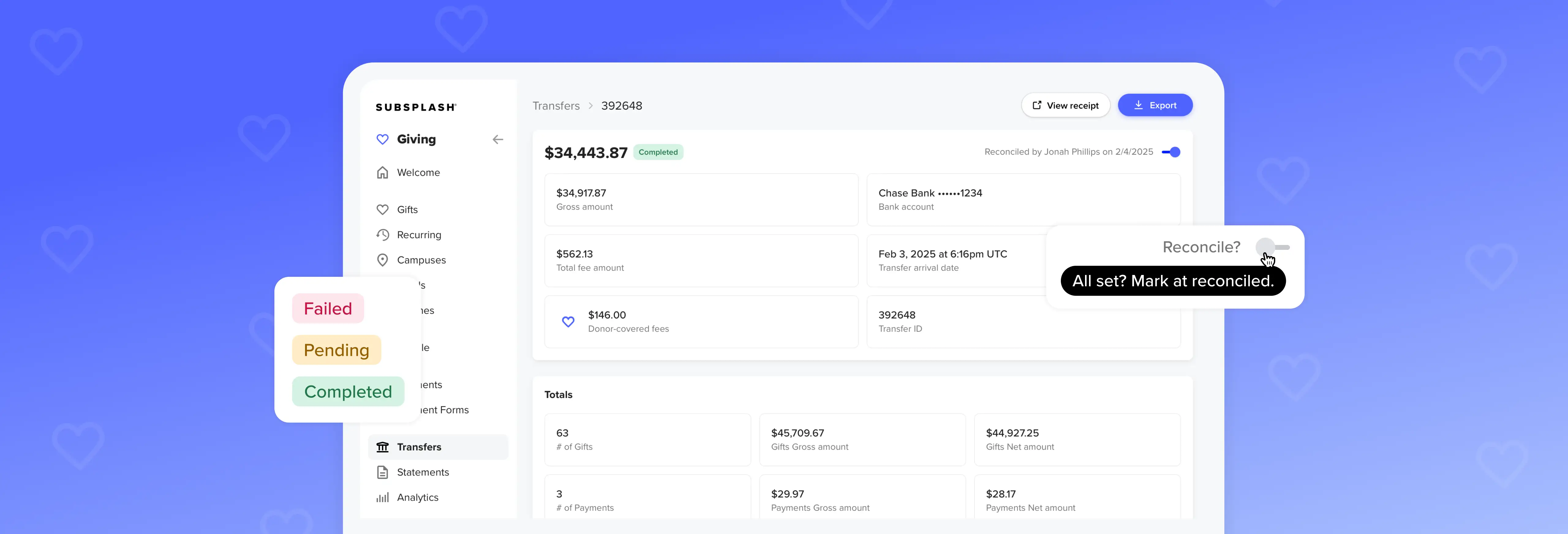
Subsplash Giving supports church giving reconciliation through its Transfers page. Each transfer shows donation and payment totals, fees, donor-covered fees, fund breakdowns, and adjustments like GrowCurve rebates on one screen. Users can mark a transfer reconciled, and Subsplash records their name and the date.
Color-coded status badges flag disputed, refunded, failed, and pending transactions, which covers the most common causes of a mismatch. Pending transfers appear before they settle. Previous and next controls let you move through a week’s deposits without returning to the list, and CSV export sends transfer details to your accounting software. For setup details, see the Transfers support article.
Turn reconciliation into a 30-minute habit
Remember Linda’s Thursday morning? With a routine in place, that same hour turns into about 30 minutes. She matches each deposit to its transfer, explains the fees and refunds, checks the fund totals, and signs off. When the month ends, she reviews work that’s already done. When she takes a week off in July, whoever covers for her can see exactly where she stopped.
The same approach works at your church. Reconcile weekly, match every deposit to a single transfer, and keep your notes and sign-offs where your giving data lives. Bring in a second reviewer so the work never depends on one person’s memory. Small, steady habits like these give your finance committee confidence in every number, and they give you more time for the ministry behind the numbers.
Over 21,000 churches and ministries use Subsplash’s tools for tasks like managing giving, tracking donor data, and keeping their books ready for review. The Transfers page brings your weekly reconciliation into the same dashboard as your giving data, so every deposit has a clear record of who checked it and when.
Take a self-guided tour of Subsplash Giving or take a minute to sign up for free and start using it today!